

THE ONLINE ATTORNEY STATE INVOICE SYSTEM
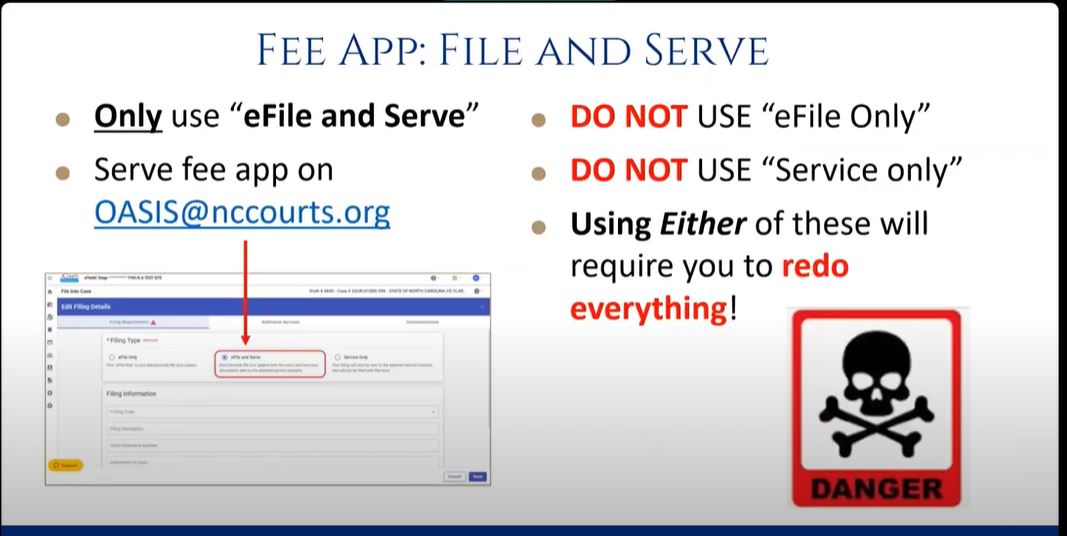
Reminder:
“File and Serve” is the middle button in eCourts.
Refer to the slide on the left.
IDS developed a payment tracking tool for attorneys who use OASIS. Download the worksheet above if you would like to access the tool designed to help you track you/your firm’s OASIS payments.
Link to the Original OASIS Training Video
Link to the New OASIS Training Video – December 2025
OASIS was reprogrammed in December 2025 in order to incorporate counties that operate on a flat fee pay schedule. This recording was originally made for Burke, Davidson, Iredell, Lincoln and Rowan counties.
**The new demo covers the changes, and experienced users from counties that do not use the flat fees will find this helpful if they happen to experience any issues with navigation (post-update).
OASIS Contacts
Remember that OASIS and MAC are currently available only for non-capital, adult criminal cases at the trial level in certain counties.
These are the current MAC counties for adult criminal: Alamance, Caswell, Chatham, Durham, Franklin, Granville, Greene, Harnett, Johnston, Lee, Lenoir, Orange, Person, Vance, Wake, Warren, Wayne
| I have a contract with IDS and use Defender Data for the cases I am contracted to do, should I stop using Defender Data and use OASIS instead? | No absolutely not. Continue using Defender Data for all cases that you are under contract for. |
| I have a MAC contract. Do I need an OASIS account? | Maybe. For all MAC cases, you will continue to use Defender Data, the IDS online billing program. If you want to take criminal cases by appointment from a county that is not covered by MAC, for example when IDS is looking for conflict counsel in a non-MAC county, then you will use the OASIS process to file a fee application and be paid for that case. |
| I have MAC contract for adult criminal work, but I am only contracted for one case type, such as Low-Level Felony. When there is a need, I sometimes agree to take on an appointment for another case type, such as Misdemeanor, in a MAC county. Do I need to use a fee application because I don’t have a contract for that case type and use OASIS? Will I need an OASIS account? | No. Because you have a MAC contract and the case is in a MAC county, you will use the Defender Data program, with these caveats: (1) If you are appointed to a case type that is lower than your current case type of contract, you only need to email the Contracts Administrator so that case type will be available to you in Defender Data. (2) If you are asking to be appointed to a case type that is higher than your current case type, you need to contact your Regional Defender for approval. With that approval, the Contracts Administrator will make that case type available to you in Defender Data. |
| Same question as above but for a non-MAC county: Do I need to use a fee application and use OASIS? | Yes. And. If a court has appointed you to higher case type than that for which you have a MAC contract, we do not second guess the judgment of that court or Public Defender and you do not need permission from your Regional Defender to take that case. Note that your Regional Defender is still available for consults and questions about that case. |
| I do not have a MAC contract, but sometimes I am appointed to an adult criminal case in a MAC county and use a fee app for payment. Do I need OASIS? | Yes. If you do not have a MAC contract and you are appointed to a non-capital adult criminal case at the trial level in a MAC county, you will need to use OASIS and a fee application. Note: If you are interested in obtaining a MAC contract, see here: https://www.ncids.org/mac/ |
| What if I still have questions? | Reach out to Chad Boykin, Assistant General Counsel, at [email protected], or 919-890-2128. |
| Question | Answer |
|---|---|
| What is OASIS? Why is OASIS being required? Who will use OASIS? When will OASIS be launched in the county/counties where I practice? What counties are currently using OASIS? | For information about OASIS, visit the OASIS information page at: https://ncids.org/oasis |
| I just joined the PAC roster in an OASIS county; how do I get set up to be paid, and how do I register for OASIS? | All attorneys doing appointed work in any NC county should complete a Substitute W-9 form and the ePay/Direct Deposit Form. After you become part of the North Carolina Financial System (NCFS), IDS will reach out to you to ensure you get access to training and login credentials. |
| Can I create my own user account? | No. Only IDS can register an OASIS user. |
| What types of cases are billed using OASIS? | Only non-capital, adult criminal cases at the trial level; the case must be heard in a county that already uses eCourts. For confidential cases (Juvenile, AND/TPR, and Competency), continue to file these via File and Serve in eCourts. (IDS hopes to expand the functionality of OASIS to include confidential case types; an announcement will be made when that occurs.) |
| What fee app is used for OASIS casework? | AOC-CR-225 |
| I need some payments made to a firm I used to be employed by and some payments made to my new firm. How does this work? | (1) Notify IDS that you need two OASIS accounts by sending an email to: [email protected]. Include your name and Bar number. Include two distinct email addresses and describe which email should be associated with which payee/law firm. **Note: The attorney must have access to each email account as long as the OASIS account associated with that email address is active. (2) Submit two separate substitute W-9 forms https://www.ncids.org/sub-w-9-form/ (submission instructions are on the form). Using these two substitute W-9 forms, the Office of State Controller will set up two supplier accounts in NCFS (this may take 1-3 weeks to process). (3) IDS will then create 2 OASIS accounts, sending login credentials to each email address provided in step 1. IDS will issue payments to the supplier/payee based on which OASIS account is used. **It is the responsibility of the attorney to use the correct OASIS account. |
| What happens if I meant to make a case payable to my new firm, but I accidentally used the OASIS account connected with my old firm? | (1) Notify IDS that payment was requested to the wrong payee/supplier, via email to: [email protected]. Include a list of all affected case numbers. (2) Issue repayment for the full amount as described here: Repayment must be made by certified check, cashier’s check, or money order made payable to “State of North Carolina Administrative Office of the Courts”, in the amount of $_______. The memo should state “return of payment (CASE NUMBER(S)” and be mailed ASAP to: Indigent Defense Services Attn: Shannon Simmons P.O. Box 2448 Raleigh NC, 27602 (3) After issuing the refund, you will need to re-request payment to the correct firm as described here: To re-request payment: 1- File the fee app for this file number to the clerk via File and Serve. 2- Serve the fee app on IDS at [email protected]. 3- Submit a new invoice in OASIS for this case. |
| What do I do if my email address changes? | You will not be able to log in to OASIS. You will need to contact IDS Assistant General Counsel [email protected], immediately to provide your name, previous OASIS username (the email you used for OASIS), and the new email address you wish to use. **To change the email address associated with your electronic payments account, you must also send a separate email to [email protected]. |
| What do I do if my name or address changes? | Fill out a new Substitute W-9 form and wait until it is processed before using OASIS to submit your next invoice. |
| What do I do if my banking information changes? | You will need to fill out and submit a new ePay/Direct Deposit Form and wait for it to be processed by the Office of the State Controller to continue billing for your cases. Only the OSC can update your banking information; this can take up to 30 days. |
| Where can I find instructions on how to use the site? | Click Here for Site Instructions. |
| How do I add OASIS as a service contact? | Click Here for Guidance on adding OASIS as a service contact. |
| What first and last name should I enter when I am creating the [email protected] service contact? | Click Here for Guidance and go to page 4. |
| I have a staff member who will be entering invoices for me. Will they receive login credentials, also? | No. If there are paralegals / administrators who will enter case details for the attorney IDS does strongly advise that they ALSO complete the training module. However, the OASIS account credentials are only provided to attorneys. If an attorney authorizes a paralegal or administrator as a designee to enter case details in OASIS and/or enter data on fee applications, please remember that the attorney is still responsible for the information entered and makes the required attestations by and through the designee. There are a few reasons for this: Even if all payments are going to one firm, and even if one paralegal is doing all the billing for the firm, the attorneys themselves must pass the training modules to acquire their unique billing credentials (And they must use their own unique email address to set up the billing account). Not only must IDS ensure that the correct attorney is paid for the correct cases, but we must also ensure—for audit purposes—that, if ever there is an investigation for high billing/fraud/data entry error, IDS can notify/audit the correct individual. And for each invoice submitted, the attorneys are the professionals who are attesting that the information submitted is true and accurate. So, if there is ever an issue, the attorney and not the designee is held responsible. |
| *HELPFUL TIP* | The email address used for the OASIS account must belong to the attorney. Depending on the email system used by the attorney or law firm, the attorney, in their own discretion, may be able to configure an email rule that automatically forwards emails from “[email protected]” to the email address of the administrator or designee to streamline their processes. |
| What do I do if the staff member who entered invoices for me separates from employment? | If the staff member who assisted the attorney with OASIS billing happens to separate from employment, please email [email protected] immediately to request a password reset for your OASIS account. |
| Question | Answer |
|---|---|
| If I have an old case for which I submitted a fee app to the court for payment, and I was never paid, can I use OASIS to bill for it? | If you have a formerly submitted fee app(s) to check on, please contact [email protected] with the file number(s). After the cases have been researched you will receive instructions from Aaron on whether to re-submit using OASIS or not for those old cases. Do not simply use OASIS without contacting Aaron first. |
| What if I realize that I submitted an invoice for a fee app I already filed, prior to the launch of OASIS? Can I just cancel the invoice? | No. You can only cancel an invoice before you hit the “submit” button. Once you click the button confirming that a fee app for that case has been filed and served and click “submit,” it cannot be retracted. For these, you will receive a rejection email, and it will not be paid. *You can ignore the rejection email. (Note: Rejection emails are sent anytime there is an invoice submitted but there is no corresponding fee app served on IDS.) |
| What does this phrase from the August 13 Press Release, mean? “IDS staff will audit the fee apps served on us against the court filings.” | IDS accounts payable staff ensure that for each case invoiced via OASIS a corresponding fee app (with matching file number and disposition date) has been served on IDS via File and Serve. Staff also audit to verify that the amounts billed on the fee app match the amount billed for the case on the OASIS invoice. IDS is only authorized to pay when the fee app (with a matching file number) has been accepted by the clerk, served on IDS, and if the total amount billed on the invoice matches the amount billed on the fee app. |
| I need some payments made to a firm I used to be employed by and some payments made to my new firm. How does this work? | (1) Notify IDS that you need two OASIS accounts by sending an email to: [email protected]. Include your name and Bar number. Include two distinct email addresses and describe which email should be associated with which payee/law firm. **Note: The attorney must have access to each email account as long as the OASIS account associated with that email address is active. (2) Submit two separate substitute W-9 forms https://www.ncids.org/sub-w-9-form/ (submission instructions are on the form). Using these two substitute W-9 forms, the Office of State Controller will set up two supplier accounts in NCFS (this may take 1-3 weeks to process). (3) IDS will then create 2 OASIS accounts, sending login credentials to each email address provided in step 1. IDS will issue payments to the supplier/payee based on which OASIS account is used. **It is the responsibility of the attorney to use the correct OASIS account. |
| What happens if I meant to make a case payable to my new firm, but I accidentally used the OASIS account connected with my old firm? | (1) Notify IDS that payment was requested to the wrong payee/supplier, via email to: [email protected]. Include a list of all affected case numbers. (2) Issue repayment for the full amount as described here: Repayment must be made by certified check, cashier’s check, or money order made payable to “State of North Carolina Administrative Office of the Courts”, in the amount of $_______. The memo should state “return of payment (CASE NUMBER(S)” and be mailed ASAP to: Indigent Defense Services Attn: Shannon Simmons P.O. Box 2448 Raleigh NC, 27602 (3) After issuing the refund, you will need to re-request payment to the correct firm as described here: To re-request payment: 1- File the fee app for this file number to the clerk via File and Serve. 2- Serve the fee app on IDS at [email protected]. 3- Submit a new invoice in OASIS for this case. |
| When OASIS asks for the disposition date, what date should be entered, based upon the status of the case? | IDS is only authorized to pay when the fee app (with matching file number AND disposition date) has been accepted by the clerk, served on IDS, and the total amount billed on the invoice matches the amount billed on the fee app. Here is what you need to know about the disposition date of your case: DO NOT ENTER FUTURE DATES FOR ANY DISPOSITION. FINAL: The disposition date is the date the case you are billing IDS for was finally adjudicated by the court. The disposition date entered on the fee app should be exactly the same as the disposition date entered into OASIS, if the case is a final fee. INTERIM: For interim fee apps, only the work start- and end- dates are used, because there is no final disposition. MAR: **For Motions for Appropriate Relief (”MAR”), use the disposition date associated with the adjudication of the MAR, not the disposition date of the underlying charge. |
| OASIS requires a file number with 6 digits after the “CR.” What if I have a file number that is shorter than that? | Verify the file number by searching for the case in eCourts. (It is possible that there may need to be a “0” in front of the first file number.) But before submitting the fee app and the invoice, please use eCourts to verify that you are billing for the correct file number and case. |
| My file number starts with “CRS” instead of “CR.” What does this mean? | The “S” was removed from Superior Court file numbers when the NCAOC began using eCourts. If you have an older case that originally had an “S,” simply remove the “S” from your fee app and OASIS invoice. |
| Why is there not a field to enter our client’s name along with the case number(s) we enter in OASIS? | IDS understands that attorneys typically know their cases by the clients’ names and not the file numbers. The use of the Judicial Branch network requires that IDS not store any identifying client information in the OASIS website. Therefore, we must rely on the case numbers and not enter any identifying client information. |
| After I File my fee app in eCourts File and Serve and Serve it on [email protected], how soon do I need log in to OASIS and invoice for that case? | Do this simultaneously. The best practice is to draft the fee application at the same time that you enter the invoice for that case into OASIS, and submit the invoice immediately after filing and serving the fee app. This practice guarantees that the amounts on the fee app and invoice match, preventing a rejection. Also, OASIS does the math for you, saving some time and work on your part. To ensure there are no issues with payment, the corresponding OASIS invoice should be prepared and submitted at least within 24 hours of filing and serving the fee app, and never more than 10 days after. Reason: Fee apps are only visible to IDS in eCourts for a limited time, because of the timing of the processes, IDS cannot guarantee that the fee app will be visible when it needs to be if more than 10 days have passed between when you filed and served the fee app and when you submitted the corresponding OASIS invoice. |
| Why should I draft my fee app while entering the case data in OASIS? | OASIS will always apply the correct hourly rate and the correct reimbursement amounts. OASIS automatically “does the math” for you. It is strongly advised for you to complete the fee app while you enter the invoice information into OASIS because doing so will: (1) ensure the correct rates are always applied, (2) save you from doing tedious calculations, (3) eliminate manual math errors, and (4) ensure that the amounts billed on the fee app are an exact match to those on the OASIS invoice. Completing the fee app and invoice simultaneously will ensure you avoid a rejected payment. (Rejected payments require you to re-do all the steps, from start to finish.) |
| Now that the county is using OASIS, what happens if I just File my fee app in File and Serve and do not submit a corresponding invoice in OASIS? | Nothing. IDS will not be able to access or pay that fee app. Once OASIS goes live in a county, it is the only way an attorney may bill for court appointed, non-capital adult criminal cases at the trail level. And it is only the OASIS invoice that “tells” IDS to look for the matching fee app. |
| What do I do if my fee app covers multiple file numbers? | Be sure to bill in OASIS using the file number associated with the highest charge. And be sure the file number you bill for is listed on the fee app as the Main File Number at the top of the AOC-CR-225. OASIS only has a place for one case file number, and only the lead file number (the one with the highest charge) should be entered in OASIS. All of the “additional file numbers” should be listed only on the fee app itself. |
| Must I wait for the email confirmation that my fee app submittal was “accepted” before I use OASIS to invoice for the case? | No, you do not. The “accepted” email happens when the clerk accepts the fee app into the court file. You can enter the OASIS invoice right after filing and serving the fee app in eCourts. |
| What happens if I receive a rejection notice/learn my fee app will not be paid? | You will need to read the rejection notice to determine where the mistake was. After the error is corrected, you will need to re-File, re-Serve, and re-Invoice that case. |
| How can I verify that I successfully submitted my fee app in eCourts File & Serve? & How can I verify that I successfully invoiced my fee app using OASIS? | You can verify both submissions by using your email search bar to search the file number(s) of the case(s) you want to check on. To verify the successful submission of the fee app: When the clerk accepts your fee application into eCourts, a “Filing Accepted” email is sent containing the file number, client name, and other information (see redacted sample below). The “Filing Accepted” email proves acceptance by the clerk of the fee app for that file number.  To verify the successful submission of the OASIS invoice: When you submit an OASIS invoice, an “OASIS Fee Applications Received” email is sent from [email protected] (see sample below). This email is your electronic record of the invoice you send to IDS. Note: IDS is not copied on these records; they are provided directly to the user as a way to track invoices that have been submitted to IDS for payment. Helpful Tip: These emails serve as a record for you; they can be saved to a special folder in your inbox, or the details can be copied, cut and pasted into a single Word document to maintain the data in a single place. The OASIS website does not store or archive this data; these records are emailed in real time.  When to Contact IDS about Status: The cases invoiced will be paid (or rejected) 30 days from the date this email is sent, please reach out to IDS only if you have not received payment or notice of rejection, if 31 or more days have passed since the send date of the OASIS email. Where to find the “send date:”  |
| Why does it look like I am only being paid $65 for my case(s)? |  Please ignore all details below the word “Order.” There is a design flaw in the configuration of the OASIS site, which is built for unit pricing. *What you need to pay attention to here is the “Total” only. And when you receive your OASIS invoice submission confirmation, everything below the word “Order” is extra information that is programmed into the system but cannot be removed. |
| If you invoice OASIS for a case but you don’t file and serve the fee app for that file number on [email protected], it will automatically generate a rejection email. Question: How can I tell whether I correctly “eFiled and Served” my fee app? | When the clerk accepts your fee application into eCourts a “Filing Accepted” email is sent to you. Look at this email to determine if your actions in Fila&Serve were correct. In the “Activity Requested” section of that email, seeing the words, “EFileAndServe” means you successfully filed the fee app and requested service appropriately. That is what you want to see. If it instead says, “EFile,” that means you did not request service / used “EFile only,” which will not serve the fee app on IDS (see the samples below). Seeing the words “EFile only” is not what you want to see.  NOTE: If the “Activity Requested” does show that you “eFiled and Served” but you still received a rejection for “No Fee App Served,” there still two other possible mistakes that could have been made: (1) A typo in the file number, meaning the file number invoiced in OASIS is different from the file number for the fee app that was filed and served; or (2) A typo in the service contact (the email address for OASIS, which must be [email protected]. If this occurs, you will need to redo all the steps. First, re-submit your fee app using “EFileAndServe” and add a clerk’s note at the top of the fee app, stating. “This is a DUPLICATE fee app, re-submitted for service to IDS after acceptance into the file. No additional action is needed.” Once that is done, you may use OASIS to submit a new invoice. |
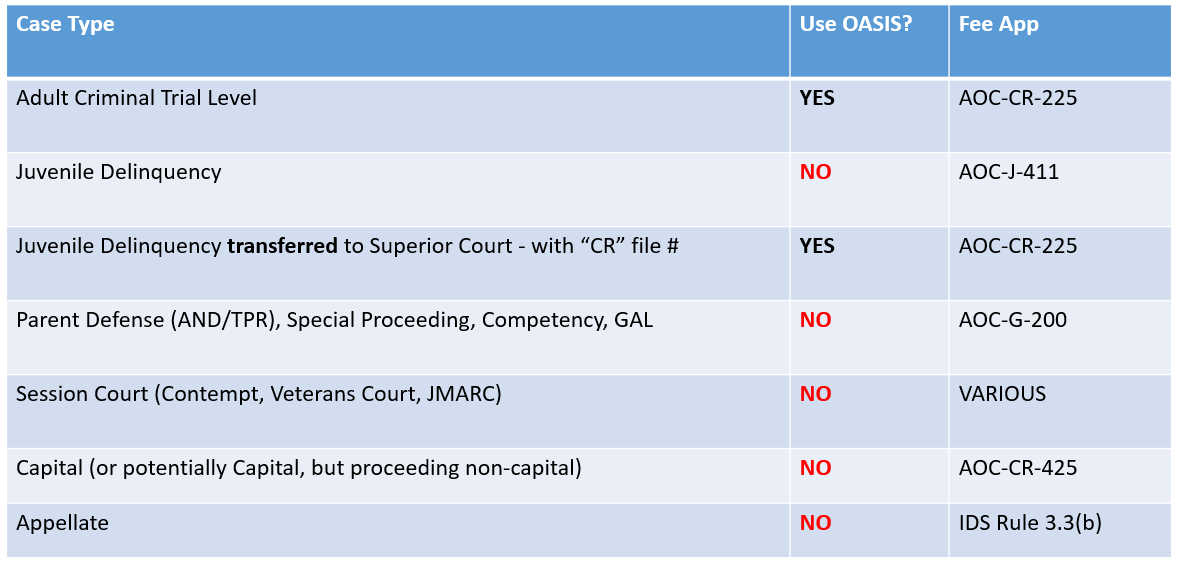
| What kinds of case types can I bill for using OASIS? | For now, only noncapital adult criminal cases at the trial level. What does that mean? (1) Cases that use the AOC-CR-225/fee app and (2) Cases that have a “CR” file number |
| What about Criminal Case Expunctions? | Cases that are dismissed/not guilty are subject to auto-expunction after 6 months. If you try to file a fee app in eCourts between month 6 and 12 there will no longer be a case to file that fee app into. For these cases, OASIS cannot be used. *However, there is a process to seek payment. Refer to: https://www.ncids.org/2024/important-update-how-to-get-paid-in-expunged-cases/ |
| What about Session Court/”Attorney for the Day?” | https://www.ncids.org/how-to-file-fee-apps-for-session-court-using-ecourts/ Attorney for the day/session court cases cannot be processed using OASIS. If your “R” file was created for an attorney for the day session where no clients showed up, continue to use the expunction process for that, since it is an attorney for the day/session court matter. |
| What about “R” Files? | Post Release Supervision, Parole Revocation Hearings, and Criminal Contempt Proceedings are “R” Files. These cases do use an AOC-CR-225 and an “R” file type. *For “R” Files, you must use OASIS and select Case Type “R” on the OASIS Invoice.  Note: “R” files are not recoupment eligible, so please do not include the client SSN on the “R file” fee app. |
| Do attorney fee apps for MARs go through OASIS? | Yes, high-level felony and low-level felony MARs do go through OASIS as long as the case was not capital. (e.g., A second-degree murder case/MAR would go through OASIS.) *Important note: If the MAR for a first-degree murder case had a death sentence at disposition, then that MAR would NOT go through OASIS—you would use the Capital Case Fee Application AOC-CR-425 to bill IDS. |
| How can I make sure I select and bill for the correct charge? | |
|---|---|
| What if my client was charged with multiple felonies (for example) Class F, D, and C felonies? | You would select / bill for the C felony (the highest charge). |
| What if my client was convicted as a habitual felon, armed felon, or violent felon? | You would select the highest charge that the client can be sentenced under. (1) Make sure that the charge listed on the fee app is the same as what is entered into OASIS, as it may affect the hourly pay rate. (2) In addition, the amounts billed must also match what is listed on the fee app that you file at disposition. |
| What charge do I select if there are multiple cases disposed of on the same day, by the same judge, in the same court? | This is consolidation. (1) All cases disposed of on the same day, by the same judge, in the same court are consolidated into one fee app. (2) Use the file number with the highest charge (Note: All hours worked on all the consolidated cases are billed on the one single fee app). (3) The fee app has a space to list the “Additional File No(s).” Those numbers should be entered on the fee app, however, in OASIS you must only enter the lead file number, not one of the additional file numbers. |
| What if I discover a billing error but I have already been paid for the case? | |
|---|---|
| What if I submitted a fee app and an invoice, got paid for it, and later realize that I did not correctly bill for all the hours I worked? | If you billed for more hours than you actually worked, please contact [email protected] for instructions on correcting the court records, addressing any overage on a civil judgment for attorney fees imposed on your client, and repaying any overpayment of state funds. If you billed for less hours than you actually worked, you will not be able to use the OASIS system to seek payment for the difference. Instead, IDS will require a supplemental fee application signed by the judge and will need to retrieve that manually, once it has been judge signed.  |
| What if the court requests a change to a fee app after it has already been submitted? | |
|---|---|
| What do I do if a judge wants me to amend a fee app that I already filed? | If the court requests a change to a fee app that has already been submitted for payment and the change does not alter the amount billed or the file number, it can be resubmitted using “File and Serve” without a new invoice in OASIS. This will allow the change to the fee app and not make a second request for payment. When resubmitting these fee apps, the attorney should: Indicate (with a note at the top of the fee app to alert the clerk that the fee app is a “Duplicate for service to IDS and that no further action is needed.” (These fee apps should not be re-tasked to the judge.) If there is a substantive error, and either the amount billed or file number does change, the attorney should: Write “Corrected Fee App” at the top of the fee app, with a note describing the issue. These corrected fee apps must be re-tasked to the judge. The attorney must also email [email protected] with the file number and/or change to the amount billed so that he can either prevent pending payment, or arrange repayment of the already paid amount, depending on the circumstances. |
| How can I get paid for cases that have been or will be expunged? | You cannot use OASIS to get paid for expunged cases because there is no court file to e-file the fee app into. To bill for expunged cases, here’s what to do: https://www.ncids.org/2024/important-update-how-to-get-paid-in-expunged-cases/ |
| What if I need to file a fee app and the filing deadline has passed? | If a serious medical issue, personal safety matter, or other force majeure, made it impossible for you to submit a fee application within the Rule 1.9 deadline, please see the “Fee App Deadline Extension and Waiver Policy” available at https://www.ncids.org/ids-policies-and-rules/. Important: The policy and the instructions on the form require that the waiver requests, fee app and timesheet be mailed to IDS to be processed. Do not submit these forms via OASIS as they will not be processed. |
| I am in a jurisdiction that has a uniform fee system for District Court. The OASIS Training Module demonstrates only an hourly fee system. How can I bill for the uniform (flat) fees that apply in District Court? | Burke, Davidson, Iredell, Lincoln, Rowan, and Cabarrus Counties have uniform fee structures. When these counties launch OASIS, the OASIS home screen will have a button for each of these specific counties, underneath the “Go To Invoice Form” button. The individual county buttons will take the user to the Invoice Form that is programmed for that uniform fee structure. Currently, there is only a button for Cabarrus County. Cabarrus County went live with OASIS in February 2025; the remaining uniform/flat fee counties go live in December 2025. |
| The OASIS Training Module (and the OASIS Training Video) demonstrates only the hourly fee system. Where can I get a demonstration of how to use the OASIS uniform fee invoice? | The uniform / flat fee OASIS invoice page (currently there is only a button for Cabarrus) is demonstrated in the “Introduction to OASIS” course that was provided to all attorneys on the adult criminal PAC Roster in Cabarrus County, prior to the launch. To get a link to the training that was provided to Cabarrus County, which is on the flat fee structure, please send an email request to [email protected]. |
| How do I seek “Exceptional Pay” (hourly pay) for a District Court case in a Uniform / Flat Fee jurisdiction, using OASIS? | Select the “Exceptional Pay” button in OASIS when the fee application seeks extraordinary pay. Note: per the Uniform Fee Pilot Policies a detailed timesheet must be attached to every fee application that is submitted for exceptional pay. And all fee applications that are drafted for exceptional pay must have a detailed timesheet attached to the fee app that is served on [email protected]. |
| Can I file interim fee apps to ensure I get regular paychecks? | No. You cannot submit interim fee apps as a means to get paid monthly by IDS. Interim fee apps may only be filed in limited situations. IDS Rule 1.9(a)(3) allows that a presiding judge may, “in extraordinary cases” allow for an interim fee (prior to final disposition). This would require that significant work has been performed (generally 12 months of work and an extraordinary number of hours). The relevant section of the rule is below: (3) Even if the trial, hearing, or other proceeding is never held, preparation therefore is nevertheless compensable and, in extraordinary cases pending in SUPERIOR court, the presiding judge may allow a fee for services rendered and payment for expenses incurred pending final determination of the case. In such cases, the time approved and hourly rate paid shall be set pursuant to subsections (1b) and (2), above. https://www.ncids.org/wp-content/uploads/2021/10/Updated-Part-1-2021.10.29.pdf |
| Question | Answer |
|---|---|
| What are the most common mistakes made using this new billing system, and what do I do if I make an error? | Click here to view the guidance on how to avoid errors in OASIS. |
| Question | Answer |
|---|---|
| What do I do if I receive a rejection notice? | You will need to re-request payment. Please take the following action: (1) Before you re-file and serve the fee application for this file number with the clerk via File and Serve, add the following note to the top of the fee application to assist the clerk: “This is a DUPLICATE fee app, re-submitted for service to IDS after acceptance into the file. No additional action is needed.“ (This will prevent the clerk from re-tasking the fee app to the judge.) (2) Use eCourts File and Serve to re-file AND re-serve the fee application on IDS using the email address [email protected]. (3) Submit a new invoice in OASIS for this case. Reminder: The following details must be exactly the same on the both the fee application and the OASIS invoice: * File number * Disposition date (or last date worked if interim), and * Total amount billed |
| Question | Answer |
|---|---|
| I need some payments made to a firm I used to be employed by and some payments made to my new firm. How does this work? | Click here to view specific instructions for those who have changed/will change firms. |
| Question | Answer |
|---|---|
| What does the attorney need to do if they learn of a reduction in the amount of a fee app? | Notify the IDS CFO, Aaron Gallagher, immediately. |
| What do I do if the judge reduces my fee award in open court? | If the judge reduces your hours in open court, the attorney must notify IDS CFO, Aaron Gallagher, immediately: If in open court, the judge authorized a lower number of hours than were actually worked and claimed on Section I of the fee app, you will need to also take the following steps: In Section I of the fee app, enter the true hours worked in the “time in court, time in court waiting, time out of court” section in tenths of an hour, and list that total number of actual hours worked in “Total Time Claimed This Fee”. In Section II of the fee app in the box “Hours Approved by the Court” the total number of hours approved by the court should be listed. Follow this same practice in OASIS. List the actual hours worked/claimed, in tenths of an hour, in the “time in court, time in court waiting, time out of court” section of OASIS. Check “Yes” on the “Did the judge reduce your fee award” question in OASIS and enter the total number of hours the judge authorized. OASIS will calculate the total for you automatically. This number should match the Total Amount in Section II of the fee app. |
| What do I do if the judge reduces my fee award after I have already submitted it? | If a judge authorizes a lower amount of hours than was claimed in Section I of a fee app they are advised to contact the IDS CFO, Aaron Gallagher, directly at [email protected] so that IDS can obtain reimbursement for any overpayment if the hours claimed were already paid. The OASIS User Agreement requires attorneys to timely reimburse IDS for any overpayments and to notify the IDS CFO immediately, via [email protected], if they become aware that the hours claimed on a fee app they have submitted and invoiced has been subsequently reduced by the judge. All fee apps and invoices are subject to audit to safeguard taxpayer funds. |
| Do I need to check up on all my cases after submitting the fee apps and invoicing via OASIS, to see if the judge reduced any of the fee awards? | No. The attorney obligation is to notify the IDS CFO immediately, via [email protected], if the attorney becomes aware of a reduction by a judge on a fee app. |
| If I am overpaid, how do I reimburse IDS? | You will receive a notice of overpayment from IDS. Upon receipt, mail a check for the amount of the overpayment to: Indigent Defense Services PO Box 2448 Raleigh, NC 27602 Attn: Aaron Gallagher |
| Question | Answer |
|---|---|
| As a judge, what do I need to know about OASIS? | Click HERE for important information for judges. |
| Question | Answer |
|---|---|
| How does OASIS impact the clerk? | Click HERE for important information for clerks. |
| What should the clerk do if an attorney re-files/resubmits a fee app? | For Service to IDS: (1) The attorney must use “File & Serve” to simultaneously file the fee app with the clerk and serve it on IDS (with [email protected] as the service contact). (2) The attorney must then submit an OASIS invoice for the case. Only “File & Serve” is authorized, not “eFile” and not “Service Only”. Note: If an attorney needs to re-file a fee app because they did not use “File & Serve” (or because there was some other issue with service), they are advised to indicate with a note at the top of the fee app to alert the clerk that the fee app is a “duplicate for service to IDS, and that no further action is needed.”***These resubmissions should not be re-tasked to the judge. For a Substantive Error Correction: If the attorney made a substantive error on an already submitted fee app that affects: (1) The file number; and/or (2) The amount of money billed, then The attorney may submit a corrected fee app to the court. If the file number or amount billed is changed, this would affect payment. In this case the attorney is advised to write “Corrected Fee App” at the top of the fee app, with a note describing the issue. ***A corrected fee app must be re-tasked to the judge. |