
Adult criminal fee apps that are filed and served *and those that are judge-signed* must still be saved/accepted into the court file.
However, you no longer need to task them to IDS using the adult criminal task queue. This is an extra benefit from OASIS. *But this currently applies only to adult criminal cases.
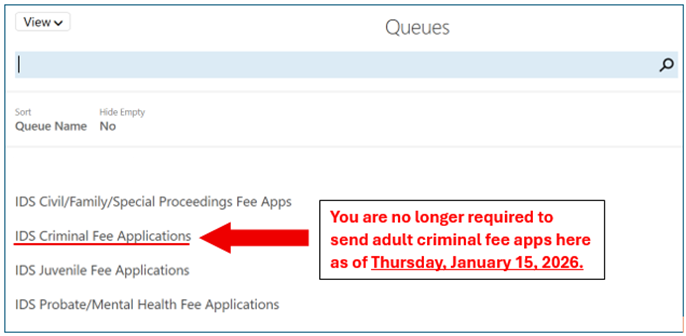
You still need to task the following fee apps using the appropriate task queue until further notice:
- Civil/Parent Defense (G-200)
- Juvenile (J-411)
- IVC (G-200)
What should clerks know if an attorney re-files/resubmits a fee app?
| For Service to IDS: (1) The attorney must use “File & Serve” to simultaneously file the fee app with the clerk and serve it on IDS (with [email protected] as the service contact). (2) The attorney must then submit an OASIS invoice for the case. Only “File & Serve” is authorized, not “eFile” and not “Service Only”. Note: If an attorney needs to re-file a fee app because they did not use “File & Serve” (or because there was some other issue with service), they are advised to indicate with a note at the top of the fee app to alert the clerk that the fee app is a “duplicate for service to IDS, and that no further action is needed.”***These resubmissions should not be re-tasked to the judge. For a Substantive Error Correction: If the attorney made a substantive error on an already submitted fee app that affects: (1) The file number; and/or (2) The amount of money billed, then The attorney may submit a corrected fee app to the court. If the file number or amount billed is changed, this would affect payment. In this case the attorney is advised to write “Corrected Fee App” at the top of the fee app, with a note describing the issue. ***A corrected fee app must be re-tasked to the judge. |
Refer to the memo below, which was sent to clerks across the state on January 14, 2026:
As of January 15, 2026, clerks in all 100 counties no longer need to use the adult criminal task queue (“IDS Criminal Fee Applications”) to send judge-signed fee apps for adult criminal cases to IDS.
- Clerks still must accept or reject all fee applications and send them to the appropriate judge for signature, just as they do now.
- The only change is that adult criminal fee apps should no longer be sent to the IDS task queue after being signed by the judge.
With OASIS now statewide, the task queue for adult criminal cases is simply no longer needed.
IMPORTANT: The elimination of the task queue currently applies only to adult criminal cases (AOC-CR-225 fee apps).
- For all other case types—juvenile, Parent Defender, and IVC Special Proceedings—you must continue to use the appropriate task queue. *Judge-signed fee applications for those case types must still be sent to IDS through the appropriate task queue until further notice.
The adult criminal task queue will officially close permanently on March 31, 2026, at the end of the business day.
- Shutting down the queue at the end of March gives staff time to finish processing any remaining items prior to its removal from your workflow.
If you have any questions about which steps are no longer required (or other
procedural questions) please contact BAPM by calling:
The AOC Helpdesk at 919-890-2407
Select Option 2 for BAPM
If you have questions about OASIS, please contact: