

You may recall…
Per Session law (S.L. 2022-47 and S.L. 2023-103) amending G.S. 15A-146(a4), for misdemeanor and felony criminal cases that are dismissed without leave, dismissed by the court, or result in a final disposition of not guilty or not responsible, the clerk must retain the criminal files for 195 days, then destroy the file (“automatic expunction”).
UPDATED INFORMATION:
Under IDS Rule 1.9, for cases appointed before January 1, 2026, attorneys have one year after the final disposition date to submit their fee app to the court.
For cases appointed on or after January 1, 2026, attorneys have 90 days after the final disposition to submit their fee apps (see 2026 policy updates).
Because auto-expunction takes place approximately 6 months after the final disposition, some attorneys will be unable to submit their pre-2026 fee apps to the court.
Here’s what you need to know…
At its November 15 quarterly meeting, the Indigent Defense Services (IDS) Commission unanimously approved a way to ensure payment for eligible cases, even if the file/records have already been purged by the court.
For cases appointed before January 1, 2026, after day 195, if there is no case file to file the fee app into, attorneys can redact the fee application and send it directly to IDS (see the instructions below). The fee app will be reviewed and, if there is no issue, will paid within 60 days of receipt.
For cases appointed after January 1, 2026, the 90 day deadline will pass before the 195 day auto-expunction.
IDS will set the fee and ensure the attorney is paid even if the case file has already been destroyed.
No judge signatures are required; IDS will set the fee.
Note: IDS may reduce fee awards or require additional documentation for fees requested that are in excess of the statistical average.
Here’s what you need to do…
Continue to file fee apps per the legacy/paper guidelines OR Odyssey/eCourts guidelines, depending on the system in place where you practice.
**If you file a fee app for a pre-2026 case that was VD/NG and you receive a notice from eCourts that the case you are looking for cannot be found, then you will need to take the following action:
- Fill out the fee app (form AOC-CR-225) for the case.
- Redact/Exclude
- client social security number; and
- client address; and
- attorney TIN (if using old form with box for TIN).
- Ensure that all other information is included on the fee app, including time worked, correct file number, and client’s name.
- Redact/Exclude
- Attach the AOC-CR-224/Order of Appointment for the case to the fee app. (**If the CR-224 is not available to you, please make a note on top of the fee app to that effect and initial it.)
- Scan and email your fee app and AOC-CR-224 Order of Appointment in a single email to [email protected]. (“FAE” in an acronym for Fee App Expunctions.)
This is what the rejection notice from eCourts looks like:
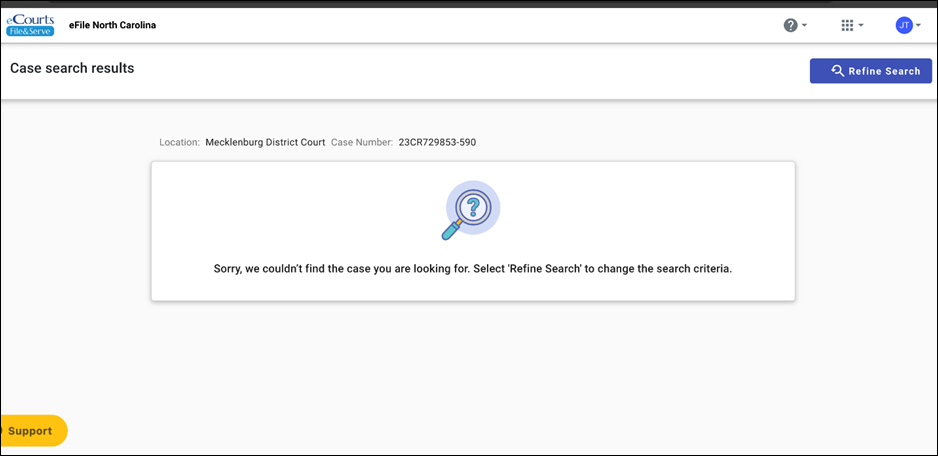
*** Anytime you receive this error message, send your redacted fee app and Order of Appointment CR-224 to IDS electronically for payment. ***